
We all already know about AI image generators. Images created with such tools are everywhere. Obviously, the very best images are created with the paid tools but even many of them have free versions you can use.
Here is a secret “graphic designers” from Twitch do not want you to know. Most of the work they do is actually AI. I created my own Twitch logo with such a tool for free. They will charge you at least $75 for it. Why pay that when the “designer” does not even design anything?
Check out the example:

It sure looks like what they offer right? Twitch streamers all know about this because there are hundreds of people trying to take advantage of these AI image generators to make money.
The problem is not finding an AI image generator. The problem is finding a good one. There are just way too many available right now, dozens. So let’s just take a look at the best ones right now for marketers and content creators.
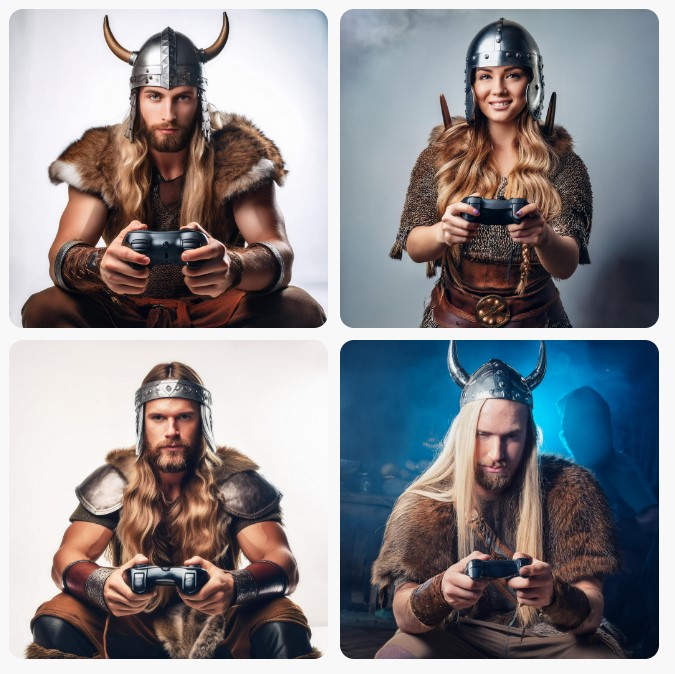
I will also show you an image created by the tool to see what it can do. The prompt used is:
“Generate an image of a young viking warrior playing video games.”
This is actually a difficult prompt because many AI generators have problems with people. But the results will most likely be quite good.
Microsoft Designer

Microsoft designer has an image creator feature. It is what was formerly known as Bing Image Creator. From my point of view, this is the very best one I tried. Obviously, this is not true for everyone so make sure to check out the other ones too.
The thing with Microsoft Designer is that it is powered by Chat GPT’s DALL-E 3, which is normally a paid feature. You can get over the payment and get several free credits to use. You just need a Microsoft account.
With this tool you can actually use several of Microsoft’s AI tools in the same place. You receive 4 images per prompt. Take one of them into the full Designer suite and you can do different things there, including removing backgrounds and more.
Pricing:
Free. But, paid versions are available if you need more credits. I used the ones from one month to generate all the tabs in my Twitch About section so you should get enough.
Adobe Firefly
Adobe Firefly is included in the Adobe suite but the free web version can be very useful. All images are safe to be used, as they are licensed as public domain. And with the free web version you can generate some pretty cool images.
Firefly lets you choose different options, like aspect ratio, whether or not the content is photo or art, and an art style if you want to. There are even some advanced things you might want to play around with, like color, tone, and image angle.
You get 4 images when you click Generate and you can then click on each one for some extra options. Either use that image as a reference for a following prompt or just edit it. You can use Adobe Express (basically Adobe’s Canva response) with just a click.
Pricing:
Web version is free – 25 credits per month. However, images have watermarks. You might need to edit them a little to remove that. The paid plans start at around $6 per month.
Canva

I was surprised to learn that most people do not even know Canva includes an AI image generator. But it does.
Most of the really good features Canva has are paid. The online image generator is not. You just need an account to use it.
Sometimes, the images are not that great. Like in the image above, you can see the controller held in a very weird way. Out of the four images generated by the prompt, only 2 were good. But, this can always happen with such tools.
The good news is you can choose out of several styles, including photography and even anime. And you can quickly use this feature in any Canva project you might be working on.
Canva is very popular among content creators and marketers. It was one of the first tools that appeared so it should be no surprise that the fact it has an AI image generator is just an extra advantage.
Pricing:
The Canva free plan offers you 50 free credits.
Dreamstudio

As you can see, the images generated were not that great when taking into account the prompt given. But, there are some advantages that can be highlighted and the tool needs to be mentioned.
You can choose out of 16 different image styles, with some being quite interesting, like neon punk or comic book. It is up to you how you use your free credits and you can include a negative prompt, which is definitely a good plus. Select one of the images you generate and then select “variations”. More images like that one can then be generated.
Pricing:
25 credits are free. Then, you pay $10 for 1,000 credits (this is enough for around 5,000 AI images)
AI Images And Copyright Laws
I have to talk a little bit about this because you might be faced with legal problems when you use AI-generated images without even realizing it. In fact, you might not do anything wrong and still have some problems.
Obviously, the biggest problems are related to US copyright laws. Fortunately, AI content is not protected. Unfortunately, this does not mean that works that were copyrighted were not used during the training of the AI tools created.
Tools like Adobe Firefly were trained with the use of completely copyright-free images. However, many use images created by users. This can lead to the creation of AI-generated images that are very close to works that are copyrighted.
Simply put, you might end up breaking copyright law without knowing it. Because of this, always double check the images you create. Simply use reversed Google Image searches. If you see that your images are too similar to something someone already uses, it is better to create something else.
Final Thoughts
At the end of the day, I completely understand that some people do not want to use AI to generate images or texts or anything else. There is an ethical thing here to take into account. But, in business, when your competition is using such tools, they gain an advantage. Also, when your budget is limited, these AI image generators can help you to get the images you need for free or for a very low amount.
My personal belief is that these AI images should just be used sporadically, as you grow your business. Always double check if you break copyright and after you get money to invest, the best and most ethical thing you could do is to hire an actual designer.
Last Note: There are countless other AI image generators on the internet. Some might be better for you and you should always keep your eyes open for new tools to use. Also, the featured image for this article was generated with the WordPress AI image generator.
Discover more from Adrian Cruce's Blog
Subscribe to get the latest posts sent to your email.
 Adrian Cruce's Blog